Logo sting
A short logo hit for intros, outros and ad end cards, reusable for any mark.
Workflows for cutting one master video into many ad variations by changing hooks, captions, calls to action and aspect ratios. This section works with real footage only.
The job: take one finished ad and turn it into many versions by changing the hook, the call to action and the aspect ratio, so you can see which versions work. Think of it as a grid: hooks across, calls to action down, aspect ratios as a third layer.
The deliverable: a folder of finished files with a naming scheme that says which hook, call to action and ratio each one is, plus a one-page sheet listing them. For example, 3 hooks x 2 calls to action x 3 aspect ratios is 18 files.
This is our own guidance, now with one measured run. We built the grid below by script with FFmpeg only, on three source clips of an open film, and report it under What we ran ourselves. We have not tested any other tool for this job, and the research found almost no open tool that edits real footage into ad variations.
One master cut, three hook options, two end cards and three aspect ratios, built and joined by one FFmpeg script: 18 files per source clip, named hook<A-C>_cta<X-Y>_<ratio>.mp4. We ran it on three source clips of Tears of Steel, one cold run and three timed runs each. The script, the numbers and the frames are on our ad variations test; the join step is on Join videos with FFmpeg without errors.
Not run by us: Agentic Video Editor, remotion-ad-video-skill and any hosted ad tool. We did not test which version performs better.
The manual route: build a template project in your editing app, with the middle locked, and swap the hook and call to action clips by hand for each version. Export presets handle the ratios. This fits when you need only a handful of versions.
The code route in our workflow fits when the grid is large or repeats every week. We found one open tool aimed at this job, Agentic Video Editor, which turns raw footage and a brief into a short ad using Gemini agents for decisions and FFmpeg for rendering. The library flags it as stale: only 6 commits, a pre-alpha web UI, a Google AI key required, and no commits since April. We have not tested it.
A second open item, remotion-ad-video-skill, makes an agent write an ad brief file before it renders. It shows no real-footage output, and Remotion's company licence applies to production use.
Joining parts that differ in size, frame rate or audio sample rate causes errors or timing problems. We measured this with FFmpeg on test files; the results are on Join videos with FFmpeg without errors.
Swapping a hook changes loudness and pace at the join. Listen at every join.
Captions are the easiest thing to forget. A new hook needs new captions.
Version sprawl: more files than a person can review. Decide how many you can actually check before you generate them.
Generated variations can drift from what was approved. Keep the approved master and the sheet as the source of truth.
Tools for this job are rare and young. We have one tested pipeline, our own FFmpeg script, and no benchmark of other tools.
A short logo hit for intros, outros and ad end cards, reusable for any mark.
Animated stat counters for results, prices and percentages that never jump sideways.
Build an FFmpeg command for common edits such as trim, join, convert and compress an MP4 file. Choose the job, set the options, copy the command.
We built 18 versions of one ad with FFmpeg: 3 hooks, 2 calls to action, 3 ratiosWe built 18 ad versions from one master with FFmpeg: 3 hooks, 2 calls to action, 3 aspect ratios. Timings, file sizes, safe-zone and loudness checks.
Pages on this site that help with ad variations: effects you can restyle quickly and a command builder.
The few tools and skills we found for ad variations. Every card is a draft until the owner reviews it.
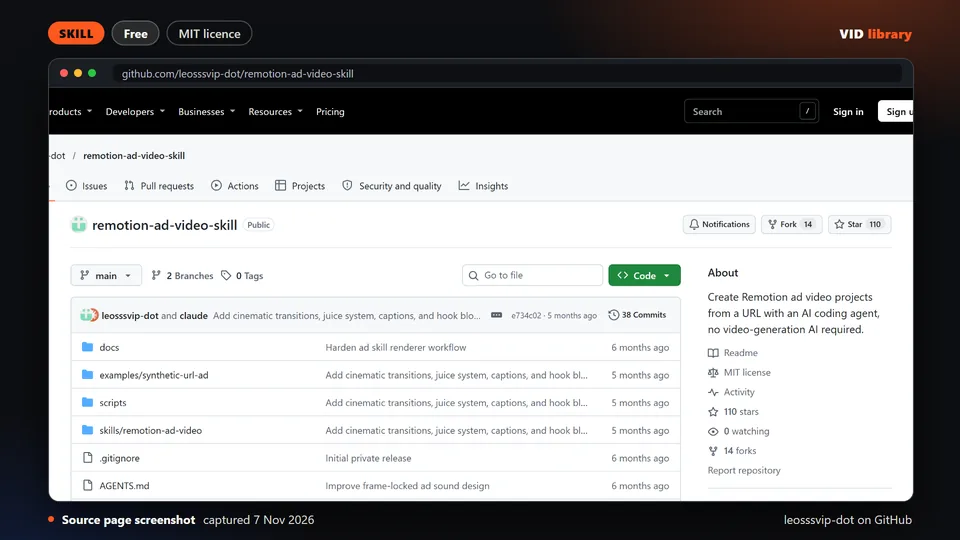
By leosssvip-dot on GitHub
MIT skill that builds ad videos from a brief file. The catch is that Remotion's company licence may apply and no real footage output is shown.
Use it for: Generates ad video variations from a structured brief.
Source reviewed on Oct 17, 2026. Not tested by us.
If your team makes ad variations every week, tell us about your grid, your stack and where the time goes. This is the job where we have the least outside evidence.
If your team makes this kind of video every week, tell us the job, the tools you use, how many you make a week and where it gets stuck: contact us. We read every message; there is no form to fill in and no account.
Page checked on Nov 4, 2026.