Effect #004 in our rendered series
Cursor zoom-follow for product demos
The camera pushes in on each click of a screen recording, for SaaS demos and tutorials.
Rendered by us at 1920x1080 over a shot from Tears of Steel (Blender Foundation, CC-BY 3.0). Expand plays the full 1080p file.
Edit in Premiere, Resolve or After Effects? Jump to editor templates. Making many versions of the same video? Use the code route.
Make this effect with
Built and tested by us
Other ways, not tested by us
Use it in a real edit
The demo above already plays the composition over real footage: the clip is a muted <video> layer under the graphics (the file plate.mp4 in the code below). Replace that file with your own clip and render again. To use the graphics in an editor instead, switch the background off and render a transparent MOV (an H.264 MP4 cannot carry transparency):
npx hyperframes render . -o overlay.mov --format mov --fps 24 --variables '{"plate":false}'The routes in full
With Claude Code: the prompt we used
Rendered and tested by us in HyperFrames 0.8.10 on Nov 14, 2026.
Build a 5-second, 1920x1080, 24 fps HyperFrames composition of a screen-recording auto-zoom from the registry component cursor-zoom-follow. Build a busy, generic mock app called "Your App" in HTML (sidebar, header with a search field, three stat cards with "Sample value" numbers, a small bar chart, a table, a primary button). The cursor clicks three targets (a stat card, the chart, the button); the camera pushes in toward each click, follows the cursor, shows a click ring, and pulls back out at the end. Nothing may be cut off at the frame edge during a zoom. Variables: zoom level, accent colour, click ring on or off, background switch.
What changed since this prompt: the demo on this page is our second version, 5 seconds long, rebuilt on a shot from Tears of Steel with the same animation idea. The full composition below is the one we rendered; its build log lists every change.
Built by a Claude Code subagent (Sonnet) from the HyperFrames registry component cursor-zoom-follow, HyperFrames 0.8.10. Claude Code then checked the composition with hyperframes lint and hyperframes check before we rendered it.
What we had to correct (14 notes from the build log):
- 4 Nov 2026 23:55 IST, lint 1: 0 errors, 0 warnings.
- The registry component is a mountable sub-composition using container query units. This one is a standalone 1920x1080 composition with the mock app drawn in plain pixels, so camera maths are exact.
- Camera is one element (`#cam`) tweened with x, y and scale together (not scale alone), so the zoom centres where intended. The centre is clamped inside the app window for every zoom level, so no zoom ever shows past the window edge. The button sits near the right edge, so at high zoom it is framed to the right of centre instead of dead centre (by design, to keep it fully visible).
- Camera targets are the card centre, chart centre and button centre; the clicks land slightly off those (a chart bar, the card value), so the whole target stays in view.
- The cursor lives inside the camera so it zooms with the screen. All later tweens use `immediateRender: false` so only the first tween paints its start state.
- Decided against: the registry's screenshot variable and menu (we draw our own generic app), and any real product name (the app is "Your App", numbers are "Sample value").
- 5 Nov 05:45 IST (lead): the automated flash check failed (6 general flashes in a second at zoom 1.8): the power3 ease swept the white app window across the dark background in a few frames. Camera moves changed to sine.inOut (about half the peak speed). Re-rendered and re-checked.
- 5 Nov 06:30 IST (lead): still 6 flashes per second after the ease change; our check reacts to fast pans across high-contrast UI detail and rises with zoom depth (1.4x scored 1, 2.2x scored 3, 2.4x scored 5). Default zoom set to 1.4x, variations 1.2x, 2.0x and no click ring. Re-rendered.
- `hyperframes check`: "Check failed", all items are contrast against the 4.5:1 body-text bar: "#search 2.78:1 (need 4.5:1)", list text 3.84 to 4.1:1, other UI labels 3.11 to 4.02:1. These are the small grey labels of a mock app window used as the thing the camera zooms into; the cursor and zoom are the effect, the mock UI text is sample text. No headline or caption text is involved. Not changed, because lifting the greys would make the mock window look unlike a real dim app UI. Recorded as by design.
- v2 (14 Nov 2026): rendered again. Every number on screen comes from our own measured test results (labelled Measured by us, 2026); frames and the poster were checked by eye.
- v2 (14 Nov 2026): bold variation zoom lowered 2.0 to 1.7 because the 2.0x pan failed the variation flash check (5 general flashes per second); re-rendered, passes.
- v2 (14 Nov 2026): bar highlight eases slowed (0.45 s in and out) and bold variation zoom lowered 2.0 to 1.45 after the 2.0x and 1.7x pans failed the variation flash check (5 and 6 general flashes per second); third render passes (2 per second).
- v2 (14 Nov 2026): poster frame moved to 1.4 s so the still shows the whole dashboard; flash check passed.
- v2 (14 Nov 2026): the effect-demo count on screen updated from 94 to 107 and dated (the site grew); rendered again.
With HyperFrames code
Rendered and tested by us in HyperFrames 0.8.10 on Nov 14, 2026.
npx hyperframes add cursor-zoom-follow
npx hyperframes render . -o out.mp4 --fps 24
Settings you can change without rebuilding (pass them with --variables):
| Setting | Name | Type | Default |
|---|---|---|---|
| Zoom level | zoom | number | 1.4 |
| Accent colour | accent | color | #2f6bff |
| Click ring | ring | boolean | true |
| Show background | plate | boolean | true |
Our full composition (index.html, 17 KB)
<!doctype html>
<html lang="en" data-composition-variables='[
  {"id":"zoom","type":"number","label":"Zoom level","default":1.4,"min":1.2,"max":2.4},
  {"id":"accent","type":"color","label":"Accent colour","default":"#2f6bff"},
  {"id":"ring","type":"boolean","label":"Click ring","default":true},
  {"id":"plate","type":"boolean","label":"Show background","default":true}
]'>
  <head>
    <meta charset="UTF-8" />
    <meta name="viewport" content="width=1920, height=1080" />
    <link href="https://fonts.googleapis.com/css2?family=Inter:wght@400;600;700&display=block" rel="stylesheet" />
    <script src="gsap.min.js"></script>
    <style>
      *, *::before, *::after { box-sizing: border-box; margin: 0; padding: 0; }
      html, body { width: 1920px; height: 1080px; overflow: hidden; background: transparent; }
      #root { position: relative; width: 100%; height: 100%; overflow: hidden; background: transparent; font-family: "Inter", sans-serif; color: #1a1f2e; }
      #plate { position: absolute; inset: 0; background: radial-gradient(120% 90% at 30% 40%, #1b2335 0%, #0b0d12 70%); overflow: hidden; }
      #world { position: absolute; left: -200px; top: -120px; width: 2400px; height: 1320px; }
      .blob { position: absolute; border-radius: 50%; filter: blur(60px); }
      .b1 { width: 760px; height: 760px; left: 180px; top: 260px; background: #ff5a1f; opacity: 0.35; }
      .b2 { width: 900px; height: 900px; left: 1200px; top: 80px; background: #2f6bff; opacity: 0.45; }
      .grid { position: absolute; inset: 0; background-image: linear-gradient(rgba(255,255,255,0.05) 1px, transparent 1px), linear-gradient(90deg, rgba(255,255,255,0.05) 1px, transparent 1px); background-size: 120px 120px; }
      #cam { position: absolute; left: 0; top: 0; width: 1920px; height: 1080px; transform-origin: 0 0; z-index: 5; }
      #win { position: absolute; left: 80px; top: 45px; width: 1760px; height: 990px; border-radius: 22px; overflow: hidden; background: #f4f6fb; box-shadow: 0 30px 80px rgba(0,0,0,0.5); }
      #win div, #win b, #win i, #win span { position: absolute; }
      #chrome { left: 0; top: 0; width: 1760px; height: 44px; background: #e9ecf4; }
      #chrome i { top: 15px; width: 14px; height: 14px; border-radius: 50%; background: #c3c9d9; }
      #chrome b { left: 0; right: 0; top: 11px; text-align: center; font-size: 18px; font-weight: 600; color: #6a7389; position: absolute; }
      #side { left: 0; top: 44px; width: 260px; height: 946px; background: #ffffff; border-right: 1px solid #e3e7f0; }
      .logo { left: 28px; top: 28px; font-size: 26px; font-weight: 700; display: flex; align-items: center; gap: 12px; }
      .lg { position: relative !important; width: 34px; height: 34px; border-radius: 10px; background: var(--accent); display: inline-block; }
      .nav { left: 18px; width: 224px; height: 52px; border-radius: 12px; padding: 14px 18px; font-size: 20px; font-weight: 600; color: #5f677c; }
      .nav.on { background: #eef2ff; color: var(--accent); }
      #head { left: 260px; top: 44px; width: 1500px; height: 80px; background: #ffffff; border-bottom: 1px solid #e3e7f0; }
      .ttl { left: 40px; top: 22px; font-size: 32px; font-weight: 700; }
      #search { left: 380px; top: 14px; width: 440px; height: 52px; border-radius: 26px; background: #f0f2f8; padding: 14px 24px 0 54px; font-size: 20px; color: #8a92a6; }
      #search u { position: absolute; left: 22px; top: 15px; width: 18px; height: 18px; border: 3px solid #8a92a6; border-radius: 50%; }
      .av { left: 1210px; top: 20px; width: 40px; height: 40px; border-radius: 50%; background: #c9d1e8; }
      #btn { left: 1280px; top: 14px; width: 180px; height: 52px; border-radius: 14px; background: var(--accent); color: #ffffff; font-size: 21px; font-weight: 700; text-align: center; padding-top: 13px; }
      .card { background: #ffffff; border-radius: 20px; box-shadow: 0 1px 0 rgba(20,24,40,0.05), 0 8px 24px rgba(30,40,80,0.07); }
      .card .lab { left: 26px; top: 22px; font-size: 21px; font-weight: 600; color: #7a8297; }
      .card .val { left: 26px; top: 62px; font-size: 46px; font-weight: 700; letter-spacing: -0.01em; }
      .card .tg { left: 26px; top: 128px; padding: 6px 14px; border-radius: 999px; background: #e7f7ee; color: #1b8a4f; font-size: 17px; font-weight: 600; }
      .card svg { position: absolute; right: 24px; top: 100px; }
      .sel { left: -6px; top: -6px; right: -6px; bottom: -6px; border: 4px solid var(--accent); border-radius: 24px; opacity: 0; }
      .ctitle { left: 28px; top: 22px; font-size: 24px; font-weight: 700; }
      .bar { width: 44px; border-radius: 10px 10px 4px 4px; background: #dfe4f2; transform-origin: 50% 100%; }
      .row { left: 0; width: 1420px; height: 40px; font-size: 19px; color: #3b4357; }
      .row span { top: 8px; }
      .row.h { color: #8a92a6; font-weight: 600; font-size: 17px; }
      .pillx { position: absolute; padding: 3px 14px; border-radius: 999px; font-size: 16px; font-weight: 600; background: #e7f7ee; color: #1b8a4f; }
      .pillx.p { background: #fff3dc; color: #a56a00; }
      .line { height: 14px; border-radius: 7px; background: #e6e9f2; }
      .dot { width: 42px; height: 42px; border-radius: 50%; background: #d3d9ec; }
      #cur { position: absolute; left: 0; top: 0; width: 44px; height: 44px; opacity: 0; z-index: 30; transform-origin: 4px 4px; }
      .rg { position: absolute; left: 0; top: 0; width: 80px; height: 80px; border-radius: 50%; border: 5px solid var(--accent); opacity: 0; z-index: 25; }

      /* footage plate (v2): real footage, pinned, no generated blobs */
      #plate { background: #000 !important; }
      #world { left: 0 !important; top: 0 !important; width: 1920px !important; height: 1080px !important; transform: none !important; }
      #world .blob, #world .grid { display: none !important; }
      #pv { position: absolute; left: 0; top: 0; width: 1920px; height: 1080px; object-fit: cover; }
      #scrim { position: absolute; inset: 0; background: rgba(0,0,0,0.35); }

      /* data family v2: dashboard window over dimmed footage */
      #scrim { background: rgba(4,6,12,0.62) !important; }
      .win { position: absolute; border-radius: 26px; background: rgba(11,15,25,0.94); border: 2px solid rgba(255,255,255,0.16); box-shadow: 0 30px 80px rgba(0,0,0,0.55); overflow: hidden; font-family: "Inter", "Montserrat", sans-serif; }
      .win .bar { position: absolute; left: 0; right: 0; top: 0; height: 64px; background: rgba(255,255,255,0.06); border-bottom: 2px solid rgba(255,255,255,0.10); display: flex; align-items: center; padding-left: 28px; gap: 12px; color: #aab3c5; font-size: 24px; font-weight: 500; }
      .win .bar i { width: 16px; height: 16px; border-radius: 50%; background: #ff5f57; display: block; }
      .win .bar i:nth-child(2) { background: #febc2e; } .win .bar i:nth-child(3) { background: #28c840; }
      .win .bar b { margin-left: 18px; font-weight: 500; }
      .chip { position: absolute; font-family: "Inter", "Montserrat", sans-serif; font-weight: 700; font-size: 26px; padding: 8px 20px; border-radius: 999px; background: rgba(255,210,63,0.14); border: 2px solid #ffd23f; color: #ffd23f; white-space: nowrap; }
    </style>
  </head>
  <body>
    <div id="root" data-composition-id="main" data-start="0" data-duration="5" data-fps="24" data-width="1920" data-height="1080">
      <div id="plate"><div id="world"><video id="pv" src="plate.mp4" muted playsinline data-start="0" data-duration="5"></video><div id="scrim"></div><div class="blob b1" id="b1"></div><div class="blob b2" id="b2"></div><div class="grid"></div></div></div>
      <div id="cam">
        <div id="win">
          <div id="chrome"><i style="left:20px"></i><i style="left:44px"></i><i style="left:68px"></i><b>Agentic Video Editing</b></div>
          <div id="side"><div class="logo"><span class="lg"></span>Video tests</div></div>
          <div id="head"><div class="ttl">Test results</div><div id="search"><u></u>Search tests</div><div class="av"></div><div id="btn">Export clip</div></div>
          <div id="cards"></div>
          <div class="card" id="chart" style="left:300px;top:375px;width:720px;height:360px"><div class="ctitle">Run time per pipeline, clip A, seconds</div><div id="bars"></div></div>
          <div class="card" id="act" style="left:1055px;top:375px;width:665px;height:360px"><div class="ctitle">Recent activity</div></div>
          <div class="card" id="tbl" style="left:300px;top:770px;width:1420px;height:190px"></div>
        </div>
        <svg id="cur" viewBox="0 0 44 44"><path d="M4 4 L4 34 L12 27 L18 40 L24 37 L18 25 L29 25 Z" fill="#ffffff" stroke="#111111" stroke-width="2.5" stroke-linejoin="round"/></svg>
        <div class="rg" id="rg1"></div><div class="rg" id="rg2"></div><div class="rg" id="rg3"></div>
      </div>
    </div>
    <script>
      window.__timelines = window.__timelines || {};
      (function () {
        const v = window.__hyperframes.getVariables();
        if (!v.plate) document.getElementById("plate").style.display = "none";
        const root = document.getElementById("root");
        root.style.setProperty("--accent", v.accent);
        const hex = String(v.accent).replace("#", "");
        const full = hex.length === 3 ? hex.split("").map((c) => c + c).join("") : hex;
        const R = parseInt(full.slice(0, 2), 16) || 0, G = parseInt(full.slice(2, 4), 16) || 0, B = parseInt(full.slice(4, 6), 16) || 0;
        const rgba = (a) => `rgba(${R},${G},${B},${a})`;
        function el(tag, cls, parent, css, text) { const e = document.createElement(tag); if (cls) e.className = cls; if (css) e.style.cssText = css; if (text) e.textContent = text; parent.appendChild(e); return e; }
        // sidebar nav
        const side = document.getElementById("side");
        ["Results", "Projects", "Renders", "Captions", "Exports", "Settings"].forEach((n, i) => el("div", "nav" + (i === 0 ? " on" : ""), side, `top:${100 + i * 60}px`, n));
        // stat cards
        const cards = document.getElementById("cards");
        const spark = ['0,34 20,26 40,30 60,16 80,20 100,6', '0,30 20,34 40,20 60,24 80,10 100,14', '0,24 20,30 40,14 60,20 80,16 100,4'];
        const labs = ["Reels measured file by file", "Resources reviewed", "Effect demos, Nov 2026"], vals = ["138", "406", "107"];
        [300, 785, 1270].forEach((x, i) => {
          const c = el("div", "card", cards, `left:${x}px;top:160px;width:450px;height:180px`); c.id = "s" + i;
          el("div", "lab", c, "", labs[i]); el("div", "val", c, "", vals[i]); el("div", "tg", c, "", "Measured by us, 2026");
          if (i === 1) el("div", "sel", c).id = "sel";
        });
        // bars
        const bars = document.getElementById("bars");
        const RUN = [["Podcast", 21.9], ["One-pass", 68.4], ["Cut+caps", 91.8], ["Ads", 95.2], ["Overlay", 173.6], ["Shorts", 188.4]];
        RUN.forEach((r, i) => { const hh = Math.round(r[1] / 190 * 200); const b = el("div", "bar", bars, `left:${50 + i * 108}px;top:${300 - hh}px;height:${hh}px;width:62px`); b.id = "bar" + i;
          el("div", "", bars, `left:${40 + i * 108}px;top:${300 - hh - 28}px;width:82px;text-align:center;font-size:17px;font-weight:700;color:#3b4357`, r[1].toFixed(1)); el("div", "", bars, `left:${30 + i * 108}px;top:306px;width:102px;text-align:center;font-size:15px;font-weight:600;color:#8a92a6`, r[0]); });
        // activity
        const act = document.getElementById("act");
        [["Export complete", "1080p, MP4"], ["Captions added", "23 of 23 phrases visible"], ["Render started", "HyperFrames, 60 s clip"], ["Silence cut", "auto-editor, clip A"]].forEach((r, i) => {
          el("div", "dot", act, `left:28px;top:${84 + i * 66}px`); el("div", "", act, `left:92px;top:${82 + i * 66}px;font-size:21px;font-weight:700;color:#1a1f2e`, r[0]); el("div", "", act, `left:92px;top:${110 + i * 66}px;font-size:17px;font-weight:500;color:#8a92a6`, r[1]);
        });
        // table
        const tbl = document.getElementById("tbl");
        const cols = [28, 420, 760, 1120];
        const rows = [["Pipeline", "Status", "Source clip", "Median run"], ["Podcast to vertical short", "Done", "Clip A", "21.9 s"], ["One-pass talking head", "Done", "Clip A", "68.4 s"], ["Caption overlay", "Done", "Clip A", "173.6 s"]];
        rows.forEach((r, ri) => {
          const row = el("div", "row" + (ri === 0 ? " h" : ""), tbl, `top:${16 + ri * 42}px`);
          r.forEach((t, ci) => {
            if (ri > 0 && ci === 1) { const p = el("span", "pillx" + (t === "Pending" ? " p" : ""), row, `left:${cols[ci]}px;top:6px`, t); }
            else el("span", "", row, `left:${cols[ci]}px`, t);
          });
        });
        if (!v.ring) ["rg1", "rg2", "rg3"].forEach((id) => (document.getElementById(id).style.display = "none"));

        // camera
        const Z = v.zoom;
        const clamp = (x, a, b) => (a > b ? (a + b) / 2 : Math.min(Math.max(x, a), b));
        function camAt(cx, cy, s) {
          if (s > 1.001) { cx = clamp(cx, 80 + 960 / s, 1840 - 960 / s); cy = clamp(cy, 45 + 540 / s, 1035 - 540 / s); }
          return { x: 960 - cx * s, y: 540 - cy * s, scale: s };
        }
        const C0 = camAt(960, 540, 1), C1 = camAt(1090, 295, Z), C2 = camAt(740, 600, Z), C3 = camAt(1710, 129, Z);
        const P0 = [520, 860], P1 = [1100, 288], P2 = [782, 625], P3 = [1710, 130], P4 = [1400, 640];
        gsap.set("#cur", { x: P0[0], y: P0[1] });
        gsap.set("#rg1", { x: P1[0] - 40, y: P1[1] - 40 });
        gsap.set("#rg2", { x: P2[0] - 40, y: P2[1] - 40 });
        gsap.set("#rg3", { x: P3[0] - 40, y: P3[1] - 40 });

        const NR = { immediateRender: false };
        const tl = gsap.timeline({ paused: true });
        // bars intro
        tl.fromTo(".bar", { scaleY: 0 }, { scaleY: 1, duration: 0.5, ease: "power3.out", stagger: 0.04 }, 0.05);
        // camera path
        tl.fromTo("#cam", C0, { ...C1, duration: 0.85, ease: "sine.inOut" }, 0.3);
        tl.fromTo("#cam", C1, { ...C2, duration: 0.8, ease: "sine.inOut", ...NR }, 1.55);
        tl.fromTo("#cam", C2, { ...C3, duration: 0.85, ease: "sine.inOut", ...NR }, 2.55);
        tl.fromTo("#cam", C3, { ...C0, duration: 1.0, ease: "sine.inOut", ...NR }, 3.85);
        // cursor
        tl.fromTo("#cur", { opacity: 0 }, { opacity: 1, duration: 0.15, ease: "power1.out" }, 0.05);
        tl.fromTo("#cur", { x: P0[0], y: P0[1] }, { x: P1[0], y: P1[1], duration: 0.8, ease: "power2.inOut", ...NR }, 0.35);
        tl.fromTo("#cur", { x: P1[0], y: P1[1] }, { x: P2[0], y: P2[1], duration: 0.75, ease: "power2.inOut", ...NR }, 1.6);
        tl.fromTo("#cur", { x: P2[0], y: P2[1] }, { x: P3[0], y: P3[1], duration: 0.8, ease: "power2.inOut", ...NR }, 2.6);
        tl.fromTo("#cur", { x: P3[0], y: P3[1] }, { x: P4[0], y: P4[1], duration: 0.6, ease: "power2.inOut", ...NR }, 3.85);
        tl.fromTo("#cur", { opacity: 1 }, { opacity: 0, duration: 0.3, ease: "power1.in", ...NR }, 4.3);
        [1.2, 2.4, 3.45].forEach((tc, i) => {
          tl.fromTo("#cur", { scale: 1 }, { scale: 0.8, duration: 0.07, ease: "power2.out", ...NR }, tc);
          tl.fromTo("#cur", { scale: 0.8 }, { scale: 1, duration: 0.14, ease: "back.out(2)", ...NR }, tc + 0.07);
          tl.fromTo("#rg" + (i + 1), { scale: 0.3, opacity: 0.95 }, { scale: 1.7, opacity: 0, duration: 0.55, ease: "power2.out", ...NR }, tc);
        });
        // click 1: stat card
        tl.fromTo("#s1", { scale: 1 }, { scale: 1.03, duration: 0.1, ease: "power2.out", ...NR }, 1.2);
        tl.fromTo("#s1", { scale: 1.03 }, { scale: 1, duration: 0.25, ease: "back.out(2)", ...NR }, 1.3);
        tl.fromTo("#sel", { opacity: 0 }, { opacity: 1, duration: 0.15, ease: "power1.out", ...NR }, 1.2);
        tl.fromTo("#sel", { opacity: 1 }, { opacity: 0, duration: 0.3, ease: "power1.in", ...NR }, 2.0);
        // click 2: chart bar
        tl.fromTo("#bar3", { backgroundColor: "#dfe4f2" }, { backgroundColor: v.accent, duration: 0.45, ease: "power1.inOut", ...NR }, 2.4);
        tl.fromTo("#bar3", { scaleY: 1 }, { scaleY: 1.07, duration: 0.1, ease: "power2.out", ...NR }, 2.4);
        tl.fromTo("#bar3", { scaleY: 1.07 }, { scaleY: 1, duration: 0.25, ease: "back.out(2)", ...NR }, 2.5);
        tl.fromTo("#bar3", { backgroundColor: v.accent }, { backgroundColor: "#dfe4f2", duration: 0.45, ease: "power1.inOut", ...NR }, 3.0);
        // click 3: button
        const S0 = `0 6px 14px 0px ${rgba(0.3)}`, S1 = `0 6px 14px 10px ${rgba(0.28)}`;
        tl.fromTo("#btn", { scale: 1 }, { scale: 0.93, duration: 0.07, ease: "power2.out", ...NR }, 3.45);
        tl.fromTo("#btn", { scale: 0.93 }, { scale: 1, duration: 0.2, ease: "back.out(2)", ...NR }, 3.52);
        tl.fromTo("#btn", { boxShadow: S0 }, { boxShadow: S1, duration: 0.2, ease: "power2.out", ...NR }, 3.45);
        tl.fromTo("#btn", { boxShadow: S1 }, { boxShadow: S0, duration: 0.45, ease: "power1.inOut", ...NR }, 4.0);
        window.__timelines["main"] = tl;
      })();
    </script>
  </body>
</html>
With Remotion
We have not built this effect in Remotion. If you use it, read its licence first: Individuals (personal or commercial use), organisations or teams with a total headcount of 3 or less, non-profits, and anyone evaluating Remotion before commercial use. A company does not qualify merely because it is unprofitable. Everyone not eligible for the Free License needs a Company License. Remotion licence FAQ, checked Nov 4, 2026.
In your editor: Premiere, Resolve, After Effects, CapCut
We have not reviewed an editor template for this effect yet.
Variations
The same composition rendered again with different settings. Nothing was rebuilt.
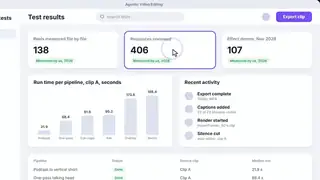
{"zoom":1.2,"accent":"#7c5cff"}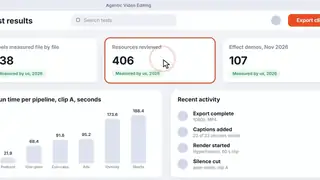
{"zoom":1.45,"accent":"#ff5a1f"}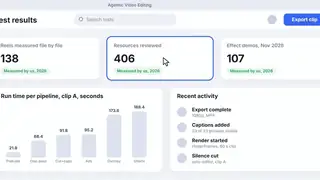
{"ring":false}Spec and test details
- Engine
- HyperFrames 0.8.10, GSAP 3.14.2 (local copy)
- Length and frame rate
- 5 seconds at 24 fps, rendered at 1920x1080
- Video files on this page
- H.264: 1920x1080 for Expand (2107.6 KB), 1280x720 in the page (942.3 KB), 640x360 in galleries (284.3 KB), no audio
- Picture check
- The 1080p file scores VMAF 98.7 against our render master and keeps 97% of its edge detail (measured by us with FFmpeg libvmaf and OpenCV)
- Footage
- balcony interior looking out over hazy Amsterdam with an airship (Tears of Steel, 1:14)
- Tested in editors
- None yet
- Flash check
- Passed: at most 0 general and 0 red flashes in any second. automated approximation of WCAG 2.3.1 on a 96x54 grid, whole loop including the restart; not a certification.
- Licence
- Composition adapted by us from the HyperFrames registry (Apache-2.0); text fonts from Google Fonts under the SIL Open Font License.
- Last tested
- Nov 14, 2026
- Machine
- Laptop: AMD Ryzen 7 7735U (8 cores, 16 threads), 31 GB RAM, Windows 11 Home; CPU rendering
Technical details: render times and file sizes
- Render of the 5-second master: 46.6 s (2 render workers, on the laptop above).
- full.mp4: 2107.6 KB
- hero.mp4: 942.3 KB
- hero.webp: 35.9 KB
- tile.mp4: 284.3 KB
- tile.webp: 12.5 KB
- Variation "subtle": rendered in 40.7 s, 256.1 KB
- Variation "bold": rendered in 21.8 s, 298.1 KB
- Variation "noring": rendered in 21.6 s, 282.4 KB
Credits
- Built from the HyperFrames registry component cursor-zoom-follow by HeyGen (Apache-2.0), adapted by us.
- Fonts from Google Fonts, under the SIL Open Font License.
- Footage: Tears of Steel, (c) Blender Foundation, mango.blender.org, licensed CC-BY 3.0. We cropped the shots to 16:9 and laid our graphics over them.
- Editor templates and other routes on this page belong to their creators, who are credited on each card.
Related effects and jobs
Page checked on Nov 4, 2026.