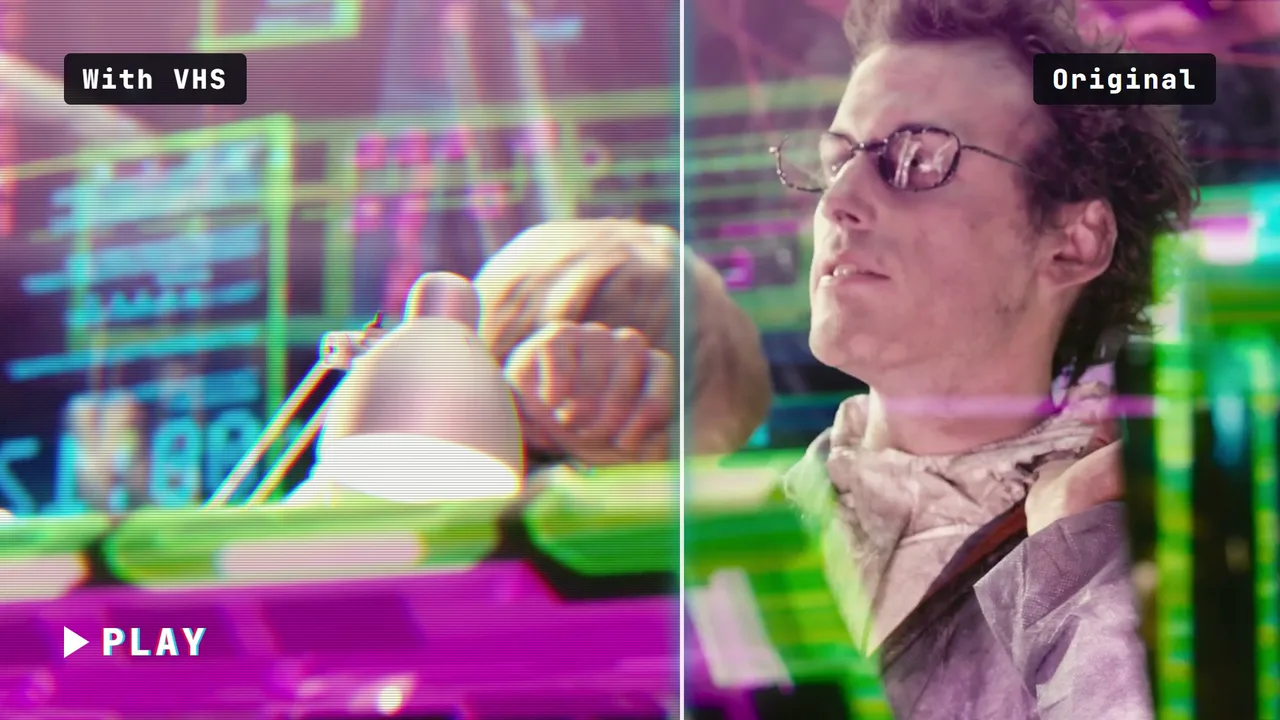
The same VHS look on the neon hologram lab. Nothing in the composition changed except the footage file.
The composition plays your clip as a muted <video> layer under the graphics (the file plate.mp4 in the code below), so you swap the footage by replacing that file and rendering again. To use the graphics in an editor instead, switch the background off and render a transparent MOV (an H.264 MP4 cannot carry transparency):
Rendered and tested by us in HyperFrames 0.8.10 on Nov 7, 2026.
Build a 5-second, 1920x1080, 24 fps HyperFrames composition of a VHS look. A title card "REWIND" with a small "PLAY" label sits over the moving background. A vertical split line sweeps left to right between 0.4 s and 3.4 s: left of it the frame is clean, right of it the VHS treatment is on: horizontal scanlines, chroma bleed on the text, soft blur, a slow tracking band rolling down, light grain and a slight line jitter. Text must stay readable. Variables: intensity (subtle, standard, heavy), tracking band on or off, background switch.
What changed since this prompt: the demo on this page is our second version, 5 seconds long, rebuilt on a shot from Tears of Steel with the same animation idea. The full composition below is the one we rendered; its build log lists every change.
Built by a Claude Code subagent (Sonnet) from the HyperFrames registry components grain-overlay and caption-glitch-rgb (scanline part); the VHS look itself is ours. HyperFrames 0.8.10. Claude Code then checked the composition with hyperframes lint and hyperframes check before we rendered it.
What we had to correct (8 notes from the build log):
4 Nov 2026 23:55 IST, lint 1: 0 errors, 0 warnings.
The registry grain overlay is a CSS-keyframe loop, which is not seek-safe, so the grain is rebuilt as an SVG noise tile whose position is stepped by the timeline 12 times a second with seeded numbers. The scanline idea comes from caption-glitch-rgb; the VHS look itself (split sweep, chroma bleed, blur, tracking band, line jitter) is new.
The split works with two full layers: a clean layer and a VHS layer, each clipped by `clip-path` to its own side of the moving line, so the title never appears twice (this also keeps the transparent-overlay render correct).
Reading of the brief: at 0.4 s the line is at the left edge, so the whole frame starts with the VHS treatment on, and the sweep wipes it clean by 3.4 s. To make the loop seamless, the tape "rewinds" in the last half second (the VHS side wipes back in from the right), so the last frame matches the first.
The tracking band is a soft light band at most 32 percent white on the heavy setting, not a flash.
Decided against: blurring with `backdrop-filter` (not reliably seek-safe); the VHS copy carries its own copy of the background instead.
`hyperframes check`: "Check failed" with one item: "text_occluded div.title inside #vplate 'REWIND' (t=1.39-1.94 s, 2 samples)". The effect is two layers, a clean one and a VHS one clipped to either side of a moving line; the check sees the semi-transparent VHS layer over the clean title as a cover. Frames from hero.mp4 at 1.2, 1.5, 1.8 and 2.1 s show REWIND fully readable on both sides of the line (RGB fringe on the VHS side only). By design.
v2 (7 Nov 2026): real footage from Tears of Steel, plates zt_arm. Clean first, VHS sweeps in behind a moving divider from 0.8 s to 2.8 s. The v1 rewind at the end was removed.
With HyperFrames code
Rendered and tested by us in HyperFrames 0.8.10 on Nov 7, 2026.
We have not built this effect in Remotion. If you use it, read its licence first: Individuals (personal or commercial use), organisations or teams with a total headcount of 3 or less, non-profits, and anyone evaluating Remotion before commercial use. A company does not qualify merely because it is unprofitable. Everyone not eligible for the Free License needs a Company License. Remotion licence FAQ, checked Nov 4, 2026.
Standard with the tracking band off{"tracking":false}
Spec and test details
Engine
HyperFrames 0.8.10, GSAP 3.14.2 (local copy)
Length and frame rate
5 seconds at 24 fps, rendered at 1920x1080
Video files on this page
H.264: 1920x1080 for Expand (5331.3 KB), 1280x720 in the page (1646.1 KB), 640x360 in galleries (318.1 KB), no audio
Picture check
The 1080p file scores VMAF 99.66 against our render master and keeps 98% of its edge detail (measured by us with FFmpeg libvmaf and OpenCV)
Footage
young Thom with a robot arm raised to his face, canal behind, soft daylight (Tears of Steel, 6:33)
Tested in editors
None yet
Flash check
Passed: at most 0 general and 0 red flashes in any second. automated approximation of WCAG 2.3.1 on a 96x54 grid, whole loop including the restart; not a certification.
Licence
Composition adapted by us from the HyperFrames registry (Apache-2.0); text fonts from Google Fonts under the SIL Open Font License.
Last tested
Nov 7, 2026
Machine
Laptop: AMD Ryzen 7 7735U (8 cores, 16 threads), 31 GB RAM, Windows 11 Home; CPU rendering
Technical details: render times and file sizes
Render of the 5-second master: 81.4 s (2 render workers, on the laptop above).
full.mp4: 5331.3 KB
hero.mp4: 1646.1 KB
hero.webp: 57.6 KB
tile.mp4: 318.1 KB
tile.webp: 17.3 KB
real-edit.mp4: 2417.6 KB
real-edit-full.mp4: 5415.4 KB
real-edit.webp: 69.1 KB
Variation "subtle": rendered in 68.5 s, 303 KB
Variation "heavy": rendered in 91.2 s, 322.9 KB
Variation "notrack": rendered in 90.5 s, 288.3 KB
Credits
Built from the HyperFrames registry component caption-glitch-rgb by HeyGen (Apache-2.0), adapted by us.
Fonts from Google Fonts, under the SIL Open Font License.
Footage: Tears of Steel, (c) Blender Foundation, mango.blender.org, licensed CC-BY 3.0. We cropped the shots to 16:9 and laid our graphics over them.
Editor templates and other routes on this page belong to their creators, who are credited on each card.